How the connection works
Available to approved ShopRest merchants. The app is installed for a store that ShopRest has approved. It is not offered as a public install from the Shopify App Store.
Live capabilities
- Product and SKU sync
- China warehouse and overseas warehouse inventory sync
- Shopify order import
- Fulfilment location matching
- Shipping calculation
- Label and tracking-number creation
- Tracking number written back to Shopify
- Fulfilment status update
- Shipment tracking
- Returns
- Per-order charge display
Authorisation
The merchant approves the connection inside Shopify. ShopRest uses that approval to read products, SKUs, inventory and orders, and to write the tracking number and fulfilment status back. The permission list the merchant sees is the one on the Shopify authorisation screen.
Setup
- 01Authorise the ShopRest App
- 02Sync products and SKUs
- 03Map Shopify locations to ShopRest warehouses
- 04Set the order routing rules
- 05Import and fulfil orders
- 06Write the tracking number and fulfilment status back
Warehouses and countries
Orders can be routed to the China warehouse in Shanghai, or to an overseas hub after stock has been replenished there. Available overseas hubs include the United States, Melbourne, Sydney, Germany and the United Kingdom. Destination routing follows the markets agreed during setup.
Fees
The app shows the charge for each order. Storage, handling and shipping rates follow the schedule confirmed on the formal quote.
Data sync
Products, SKUs, inventory and orders sync between the authorised store and ShopRest. After dispatch, the tracking number and fulfilment status are written back to Shopify.
Exceptions
An order that cannot be matched to a warehouse, a sync that does not complete, or a missing tracking write-back stays visible for the service team. The merchant does not have to chase the warehouse and the carrier separately.
Support
Write to info@shoprest.global, or use the contact page. WhatsApp is available outside mainland China, and WeChat inside mainland China. A click there is a contact request. The store is connected after ShopRest approves it.
Privacy and deletion
Store data is used to fulfil orders for that merchant. To disconnect the store and ask for the copied data to be deleted, email info@shoprest.global. Records that the service agreement or the law requires ShopRest to keep are retained.
Live screen
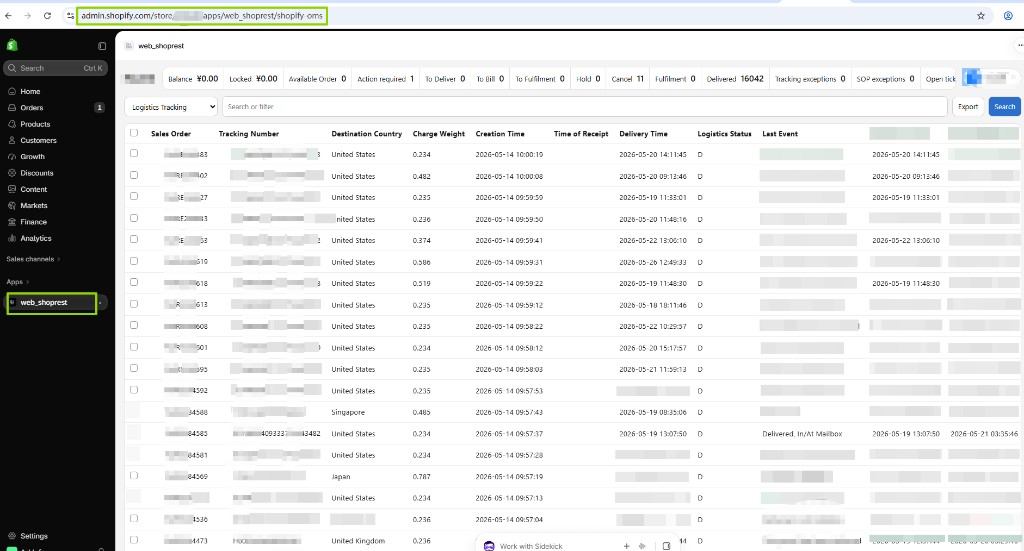
Screenshot from the live ShopRest Shopify App. Customer and order data may be anonymised. A guided walkthrough is provided during setup.
Request Shopify integration